
6 min read · 2026-11-21
UXInteract: Measure how well coding agents complete tasks and work with users
TL;DR
Real coding work involves feedback and evolving requirements; single-turn correctness alone misses how well agents collaborate with users. We contribute a benchmark and an interaction evaluation framework for coding agents.
- Benchmark: 141 executable tasks across six coding domains, with instructions, environments, verifiers, and reference solutions.
- Interaction evaluation: Runs multi-turn episodes in persistent workspaces, generates adaptive user feedback, and records progress. Functional tests assess task completion; an LLM judge assesses the interaction.
Why evaluate beyond the first turn
Coding work often continues after an initial answer. A user may report a failure, clarify a requirement, or ask for stronger tests. A useful agent must carry earlier context forward and make the next revision work.
A good user experience means completing the task with little unnecessary effort, understanding complex and changing instructions, raising important questions or risks at the right time, and giving useful, clear and complete responses. UXInteract currently captures part of this picture through first-turn and final task success, success across repeated runs, and an overall judged interaction-quality score. These measures help assess task outcomes and the interaction.
The below examples illustrate both the interaction process and its effect on the outcome. The chair animation shows how a user and a coding agent exchange requests, feedback, and revisions. The Pelican Test compares the agent’s initial output with the result after feedback and revision.
The agent gets the full chair brief up front, then uses feedback to fix what it missed.
The Pelican Test
The Pelican Test asks for a 97-second animated film, an original synchronized score, and a seekable browser player. The rider travels through twenty art styles at 120 BPM before a press conference.
Single turn
Initial responseMulti-turn
After feedback and revisionHow we evaluate interactions
How an episode runs. An episode follows one attempt at a task, from the initial request through any follow-ups. The agent continues in the same conversation session and workspace, while we evaluate both the code it produces and how it responds to feedback.
The agent receives an instruction and an isolated workspace, then edits code and runs tools. After each round, a verifier checks the result.
If more work is needed, the simulated user receives summaries of earlier turns, code changes, and a high-level verification outcome. Hidden tests and raw verifier logs stay private. Based on that evidence, the user can request targeted debugging, stronger tests, or clarification of a requirement. The agent then revises its work in the same workspace. By default, the episode ends when all verifier checks pass or the turn limit is reached.
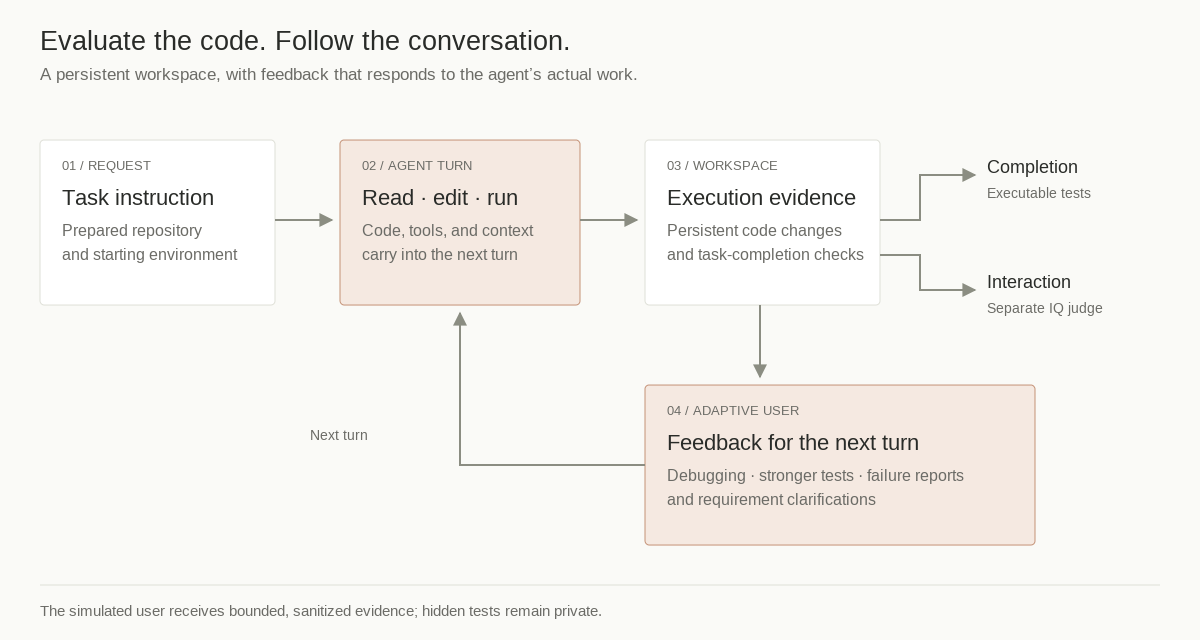
How we score an episode. Executable tests assess task completion and provide the results for Pass₁, PassF, and Pass². An LLM judge assesses interaction quality for Mean IQ by reviewing the recorded conversation and verification evidence. It considers correctness, the latest user requirements, context continuity, corrections, testing and user effort.
- Pass₁ (First-turn success): The average per-task success rate after the initial request, using the task verifier.
- PassF (Final success): The same verifier-based success rate at the end of the episode.
- Pass² (Success in both runs): The fraction of tasks for which both attempts pass the task verifier.
- Mean IQ (Judged interaction quality): The average overall interaction-quality score from the LLM judge, on a 0–1 scale.
How UXInteract compares
| Benchmark | Interaction | Task source | Evaluation | Tasks | ||
|---|---|---|---|---|---|---|
| Multi-turn | Adaptive feedback | User–agent traces | Per-turn tests | Interaction quality | ||
| SWE-bench Verified | — | — | — | — | — | 500 |
| SWE-Together | ✓ | ✓ | ✓ | — | ✓ | 109 |
| EvoCode-Bench | ✓ | — | — | ✓ | — | 26 |
| UXInteract | ✓ | ✓ | ✓ | ✓ | ✓ | 141 |
How we built the benchmark
We anchor each trajectory to its repository and commit, recover the starting state and reference change, and reconstruct the instruction, environment and tests. A candidate becomes a Harbor task only when the environment builds, the verifier fails on the starting state, and it passes after the reference change.
Complete, executable tasks
Package the instruction, starting workspace, environment and verifier. Keep the reference solution hidden from the evaluated agent.
The UXInteract 0.1 catalog contains 141 executable tasks across application development, frontend development, build and deployment, data analysis, machine learning, and UI optimization.
Each task combines an instruction, a starting environment, a verifier, and a reference solution. The verifier supplies an executable check of the result.
task_id/
├── instruction.md       # Task instructions
├── task.toml            # Configuration
├── environment/
│   ├── Dockerfile       # Container definition
│   └── code/            # Initial workspace
├── solution/
│   └── solve.sh         # Reference solution
└── tests/
    └── test.sh          # Verification entry point
What the reported results show
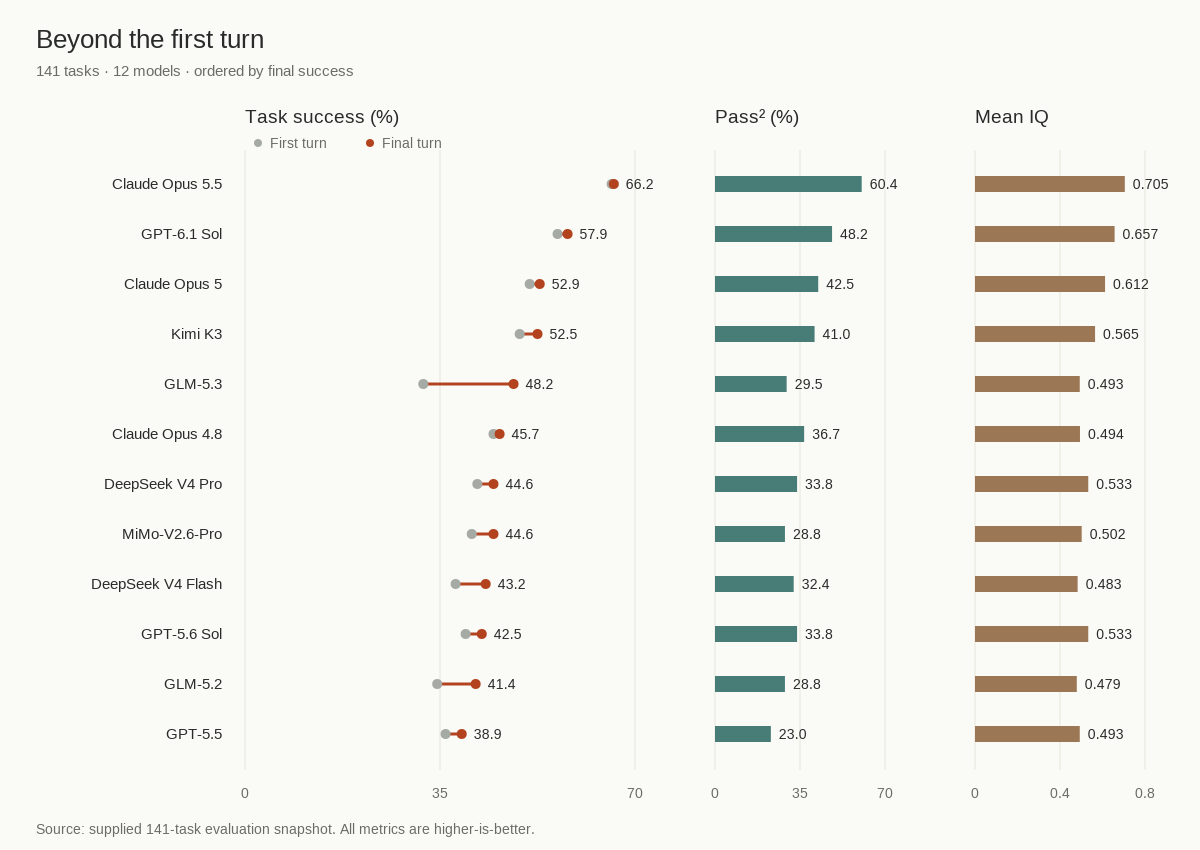
The comparison below shows results for 12 models on UXInteract, ordered by final success.
+4.1 pp
Average improvement
All 12 models improve from first-turn to final success.
66.2%
Highest final success
Claude Opus 5.5 also leads Pass² (60.4%) and Mean IQ (0.705).
+16.2 pp
Largest improvement
GLM-5.3 rises from 32.0% first-turn success to 48.2% final success.
Equal completion rates can hide different interaction scores. DeepSeek V4 Pro and MiMo-V2.6-Pro both finish at 44.6%, but their Mean IQ scores are 0.533 and 0.502. Their Pass² scores also differ: 33.8% and 28.8%.
Repeated success is a separate challenge. Every model’s Pass² is below its final success rate in this snapshot. Solving a task once does not establish that the agent will solve it consistently.
View all 12 models Four metrics · ordered by final success
On narrow screens, scroll the table horizontally to see every metric.
| Model | Pass₁ | PassF | Pass² | Mean IQ |
|---|---|---|---|---|
| Claude Opus 5.5 | 65.8% | 66.2% | 60.4% | 0.705 |
| GPT-6.1 Sol | 56.1% | 57.9% | 48.2% | 0.657 |
| Claude Opus 5 | 51.1% | 52.9% | 42.5% | 0.612 |
| Kimi K3 | 49.3% | 52.5% | 41.0% | 0.565 |
| GLM-5.3 | 32.0% | 48.2% | 29.5% | 0.493 |
| Claude Opus 4.8 | 44.6% | 45.7% | 36.7% | 0.494 |
| DeepSeek V4 Pro | 41.7% | 44.6% | 33.8% | 0.533 |
| MiMo-V2.6-Pro | 40.7% | 44.6% | 28.8% | 0.502 |
| DeepSeek V4 Flash | 37.8% | 43.2% | 32.4% | 0.483 |
| GPT-5.6 Sol | 39.6% | 42.5% | 33.8% | 0.533 |
| GLM-5.2 | 34.5% | 41.4% | 28.8% | 0.479 |
| GPT-5.5 | 36.0% | 38.9% | 23.0% | 0.493 |
Why do strong models still fail on UXInteract?
The evaluation on UXInteract reveals challenges in implementing the logic behind requested behavior, enforcing business rules across modules, and turning user feedback into verified fixes.
1. Translating user requests into the right program logic. Users describe the outcome they want, leaving the agent to determine the logic and data changes needed to deliver it. This includes recognizing when changes must persist beyond the current page state. An implementation that updates only the HTML can appear complete while missing that requirement. In the paragraph editor task, GPT-6.1 Sol and Opus 5.5 changed the HTML without updating the underlying logic or data. The edited text appeared when the editor closed, making the change look successful, but disappeared on reload.
2. Enforcing rules across the entire workflow. A rule must remain effective as work passes between different parts of a program. When one component detects invalid data, any later action that requires valid data must be blocked. In the checkpoint and rollback task, a corrupt snapshot must prevent plan generation. In our follow-up check, both GPT-6.1 Sol implementations detected the corruption but still generated a plan. Both Opus 5.5 implementations checked the validation result before planning and refused to proceed.
3. Using feedback to implement and verify a fix. User feedback often describes the symptoms of a problem. The agent must reproduce the failure, identify the responsible code, and test the revised implementation through the original workflow. In the LaTeX build task, the user feedback asked the agent to confirm that the build produced a valid PDF. GPT-6.1 Sol checked for a successful exit status and a nonempty output file, but the file contained plain text. In one run, Opus 5.5 identified the format problem but did not correct the required build entry point. Completing the task required repairing the specified build command and opening its output to verify that it was a valid PDF. However, all reviewed agent attempts failed the task’s checks.
What to take away
We contribute both an executable coding benchmark and an interaction evaluation framework. Together, they measure task completion, consistency across runs and interaction quality, showing how agents respond to feedback and evolving requirements.
Citation
If you use UXInteract, please cite the project.
@misc{legox2026uxinteract,
  title = {{UXInteract}: Unlocking the value of human-agent interaction trajectories},
  author = {{The LegoX team}},
  year = {2026},
  url = {https://uxinteract.intellegox.net/}
}